
I've been using AI-assisted coding tools since the early days: Tabnine in 2018, Copilot when it launched, and now Cursor daily. Mostly on large production codebases with years of accumulated decisions. The experience has been... uneven.
Some sessions are genuinely productive. Others devolve into me fixing AI-generated bugs for hours. The difference comes down to context management.
This post is my attempt to articulate what I've learned about context engineering: the systematic management of information you give AI systems. It's less about clever prompts and more about information architecture.
The "dumb zone"
If your agent starts saying "You're absolutely right, I apologize for the confusion," you're probably in the dumb zone. The context filled with noise, corrections piled on corrections, and now every decision is compromised.
This happens more on some codebases than others. Greenfield projects work well: a new Vercel dashboard, a standalone script, a fresh API. A 10-year-old Java codebase with undocumented conventions? Different story. Yegor Denisov-Blanch's survey of 100,000 developers found the same pattern: most AI-assisted coding produces massive codebase churn. You're shipping more, but much of it is reworking what you shipped last week.
LLMs are stateless. Every conversation starts fresh. The model is plenty smart; it just doesn't know what you know. The only way to get better output is to put better tokens in. Every time the agent picks its next action, there are hundreds of right paths and hundreds of wrong paths. The only thing influencing that choice is what's in the context window.
The Lost in the Middle paper found that LLMs perform worse on information buried in the middle of long contexts, sometimes degrading by 70%+. Dex of HumanLayer calls this the "dumb zone": once you're past roughly 40% of your context window, you start seeing diminishing returns. More tokens, worse decisions.
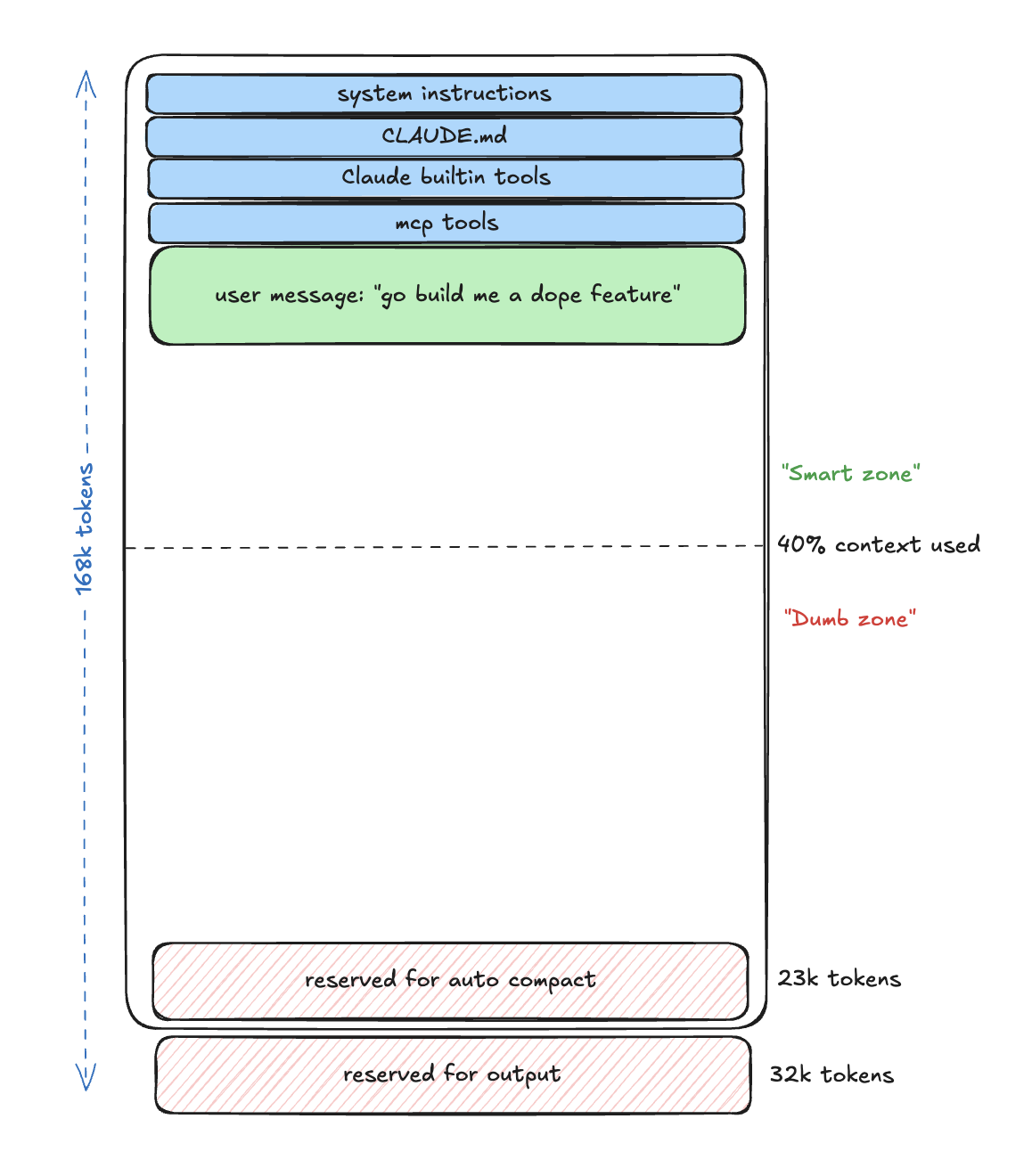
User message in smart zone
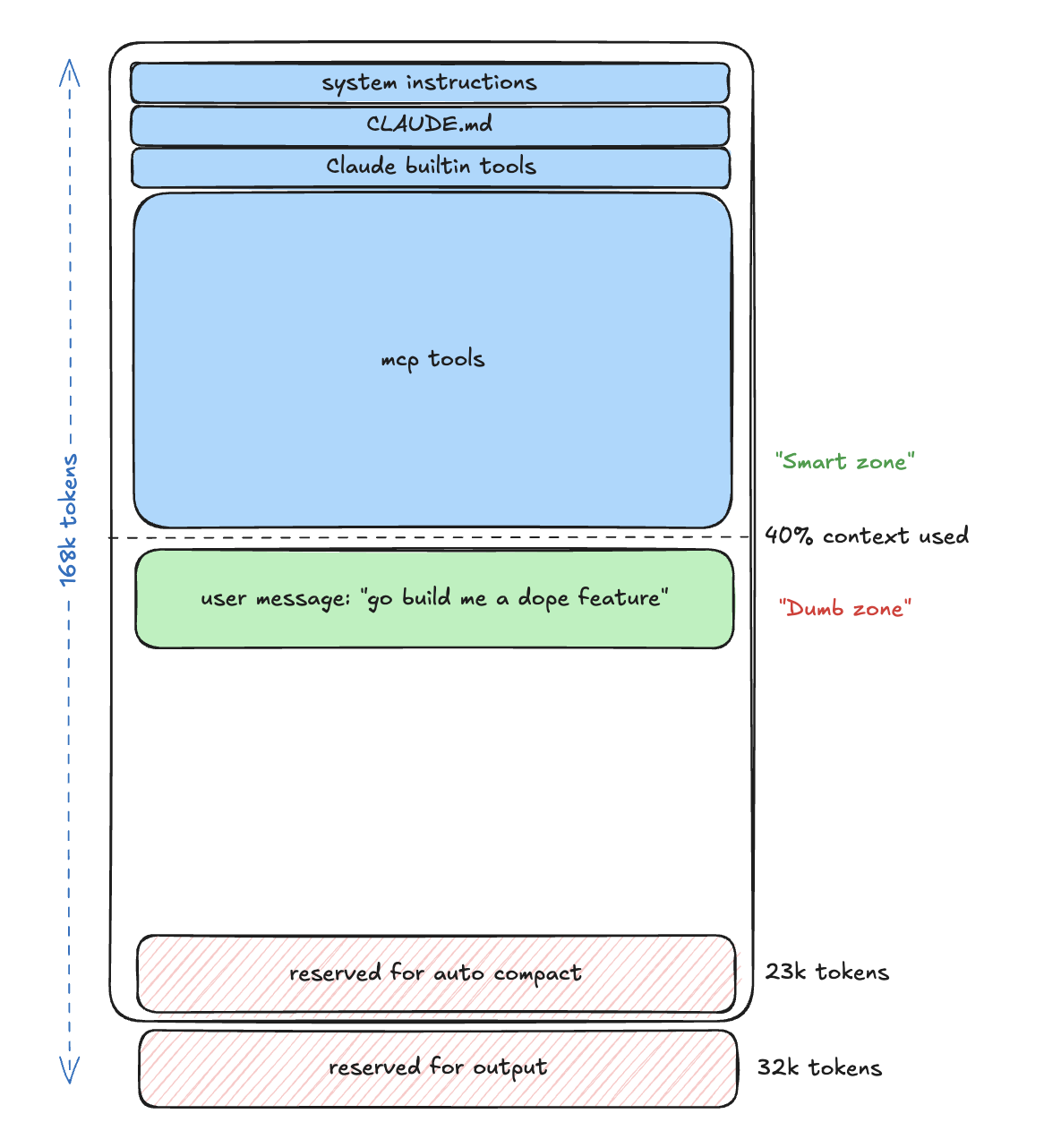
MCP tools push into dumb zone
Context engineering, not prompt engineering
A recent survey covering 1,400+ papers frames it this way: context engineering is about assembling the right information, in the right structure, at the right time.
The context you give an LLM isn't a monolithic string. It's assembled from multiple sources: system instructions, relevant code, tool definitions, conversation history, current state, and the immediate query.
The default approach is to write a prompt and hope. What I'm trying to do is build a system that consistently assembles good context, regardless of the specific task.
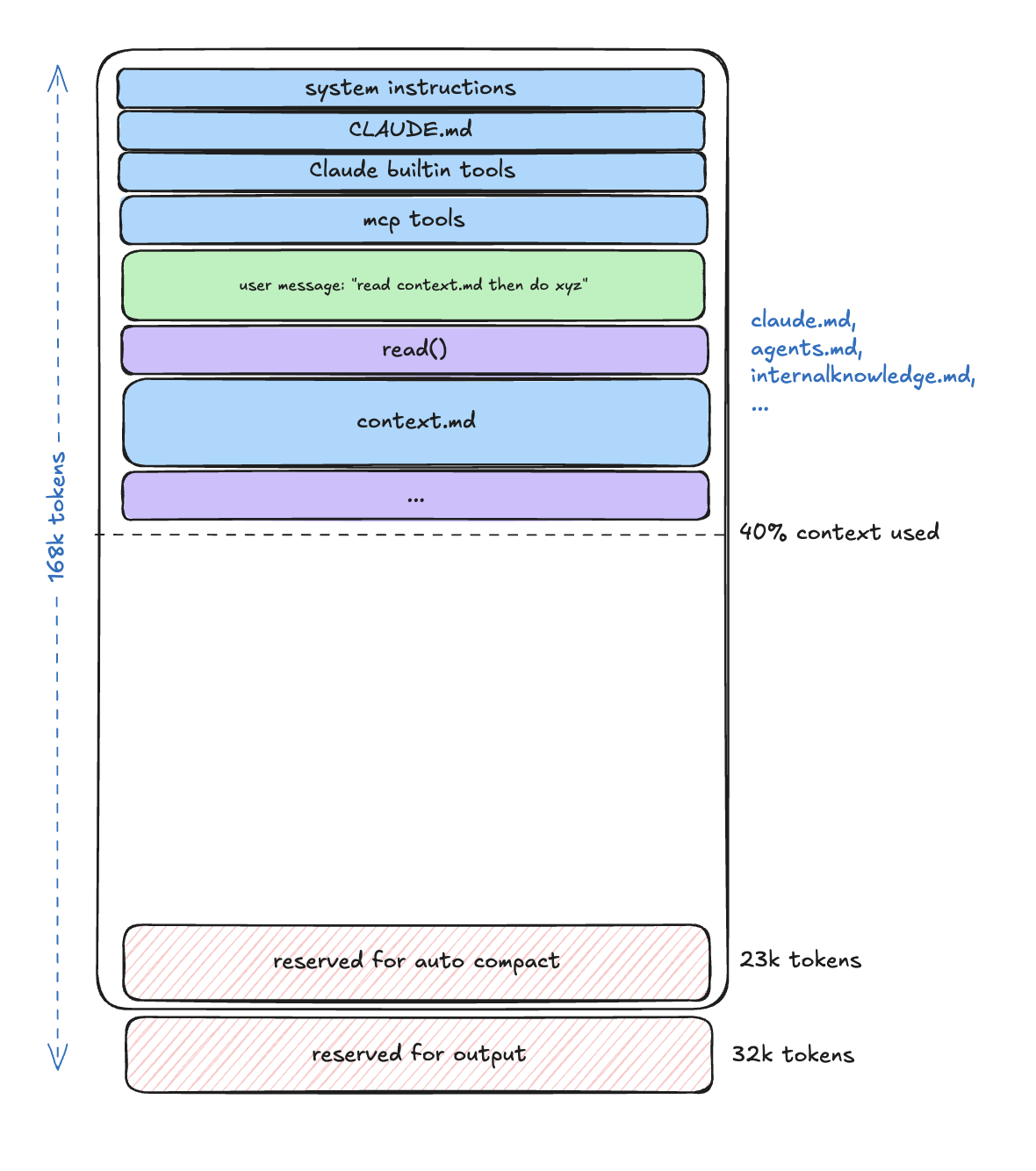
Context and user message in smart zone
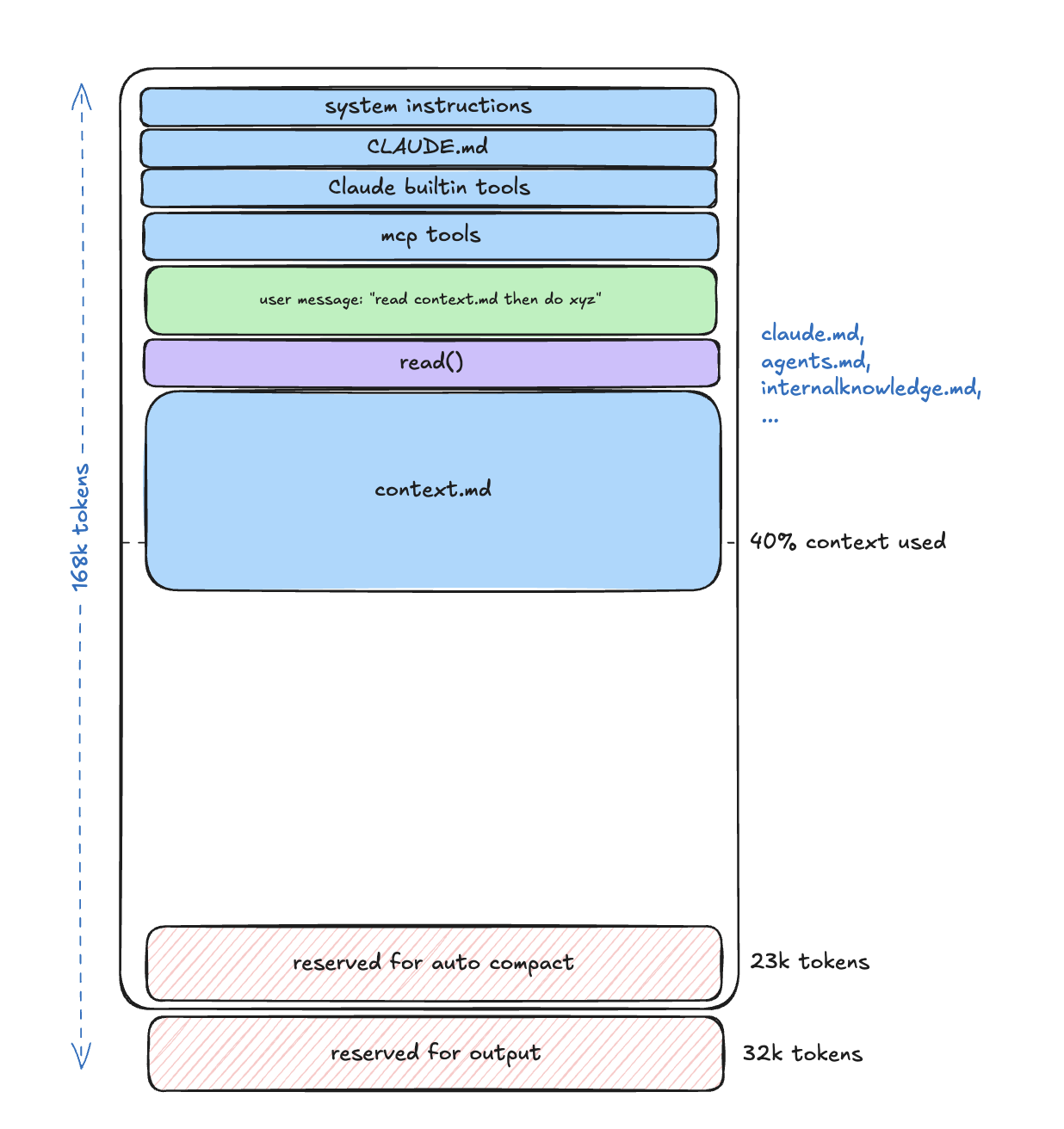
Context eats up smart zone
Onboarding agents
Without context, your agent doesn't know your codebase exists. It will invent patterns, ignore conventions, and confidently break things.
Progressive context disclosure
The naive approach is to dump everything in a massive system prompt. But that puts you in the dumb zone before you've done anything useful.
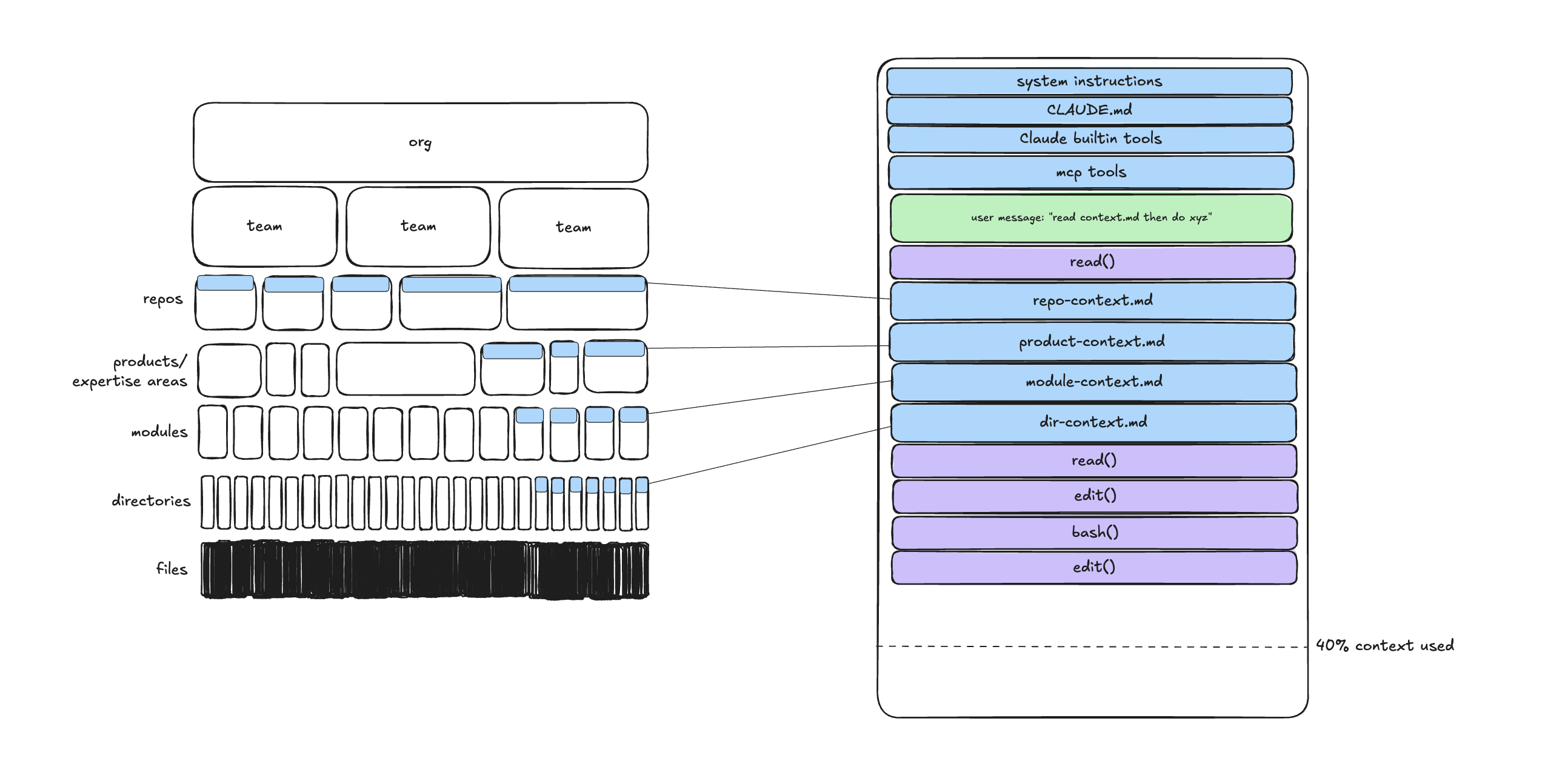
What works better is hierarchical context that gets pulled in based on where you're working.
repo-root/
├── .cursorrules              # Top-level: project conventions, tech stack
├── pkg/
│   ├── .context.md           # Package-level: architecture of pkg/
│   ├── auth/
│   │   ├── .context.md       # Domain-level: auth subsystem details
│   │   └── handler.go
│   └── api/
│       ├── .context.md       # API-specific patterns
│       └── routes.go
└── docs/
└── architecture.md # Reference architecture (linked, not inlined)When the agent works in pkg/auth/handler.go, it pulls in the root .cursorrules, the package-level context, and the domain-level context. Pull in what's needed, leave out what isn't.
I treat .cursorrules as my "Manager README." It contains the non-negotiables: which libraries we use, which patterns we avoid, the testing conventions. Things I'd tell a new hire on day one.
On-demand context over static documentation
Documentation lies.
Between actual code, function names, comments, and documentation, documentation has the highest density of stale information. The further you get from the actual code, the more likely it is to be wrong.
The problem compounds when you ship new functionality. Your repo-level docs, product-level docs, and module-level docs all become "now out of date" the moment you merge.
You can build a system that auto-updates docs, but you probably won't maintain it.
What works better is on-demand compressed context. When starting a task, run a research phase that takes vertical slices through the actual codebase and produces a snapshot of truth. The research document might say the same things a doc would say, but it's derived from current code, not aspirational markdown from six months ago.
Research, plan, implement
After trying various workflows, the one I keep coming back to has three phases: Research, Plan, Implement. Each phase produces a compressed artifact that feeds the next.
Research: understand the system
Before touching code, have the agent understand how things work. No code, no solutions yet. Just learning.
Research documents what exists. No suggestions, no critiques. The agent describes what exists, where it exists, how it works. Just a map.
The goal is to produce a research document that captures:
- Exactly which files matter to this task (with line numbers)
- How the current system handles the relevant flows
- What conventions and patterns exist
- Where the complexity actually lives
What makes this work is that each sub-agent runs in its own context window. A research sub-agent spawns, reads dozens of files, traces code paths, fills up its own context, and then returns just a compressed summary. The parent agent never sees all that reading, just the distilled understanding.
I've seen teams create "frontend sub-agent" and "backend sub-agent" and "QA sub-agent" like they're building an org chart. Sub-agents exist for context control, not org-chart cosplay.
The pattern: parent agent starts with a clean context. It spawns a sub-agent with a narrow task like "find all files related to [specific feature]." The sub-agent reads 50+ files, fills its own context to 80%, then returns a compressed summary. Parent context is still at 6%, but now has the knowledge it needs.
Examples:
| Sub-Agent | Task | Input (consumes) | Output (returns) |
|---|---|---|---|
| Locator | Find WHERE files/components live | Reads file tree, greps for patterns, opens candidates | 5-10 file paths with line numbers |
| Analyzer | Understand HOW specific code works | Reads entire files, traces call chains, follows imports | Summary of flow + key decision points |
| Pattern Finder | Find existing examples to follow | Searches for similar patterns, reads implementations | 1-2 code snippets showing "how we do this here" |
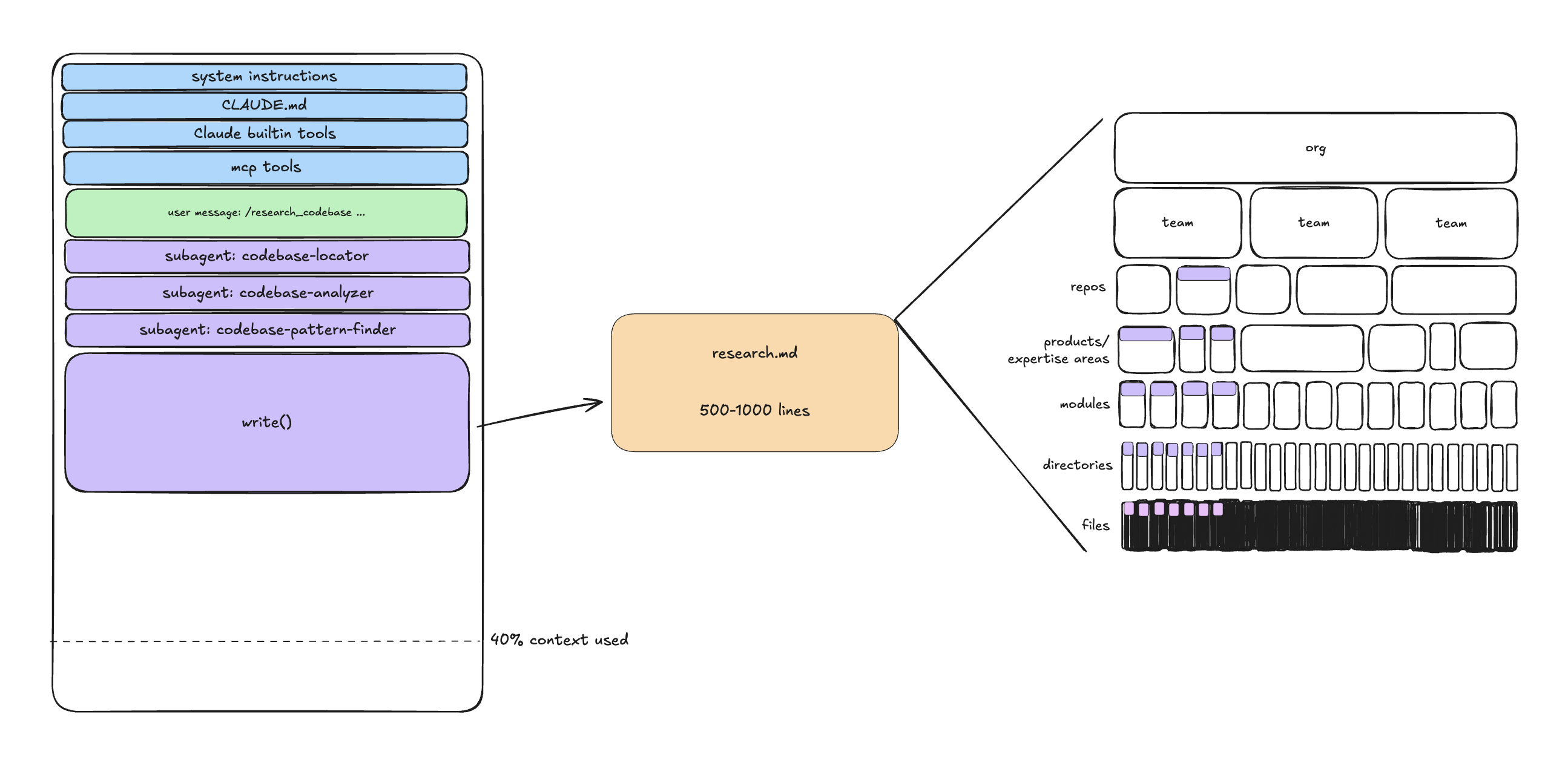
The key is what the research output doesn't include: 500 lines of code, every file the agent explored, verbose explanations. Just compressed understanding.
- Input: 50+ files, thousands of lines of code
- Output: One markdown file
- Context cost: High during research, near-zero for the next phase
Plan: outline the exact steps
With research in hand (in a fresh context window), create a plan. The plan should be explicit enough that there's little room for interpretation.
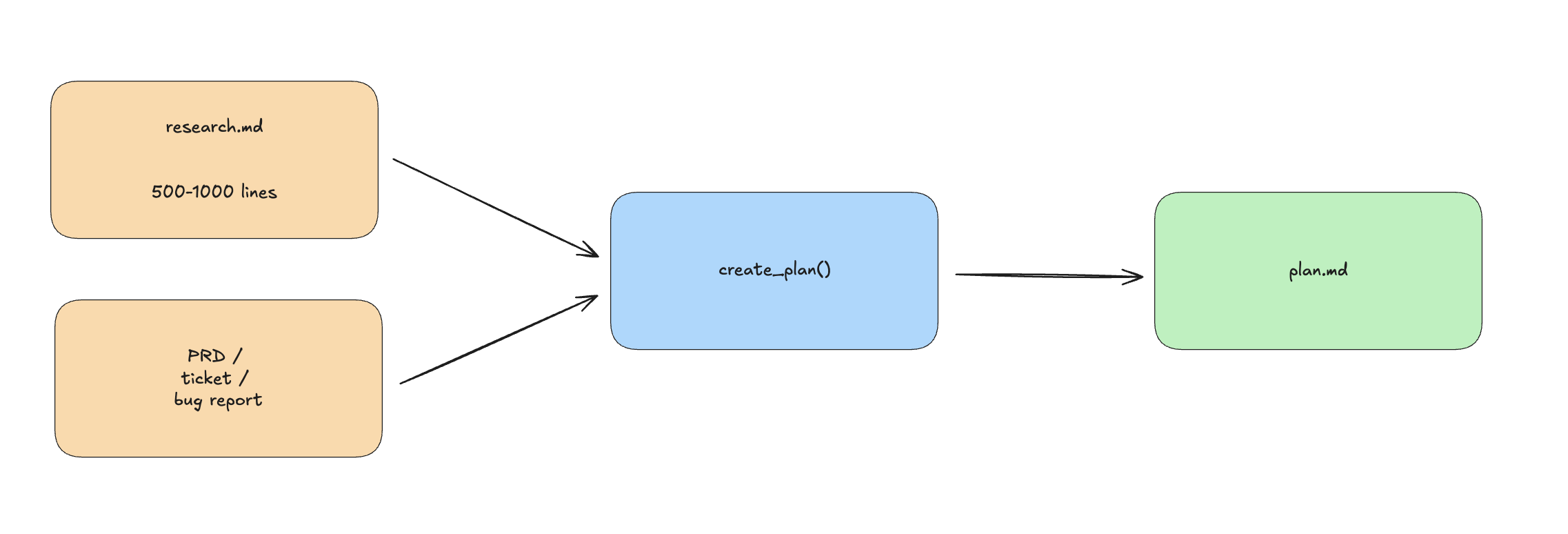
A good plan includes:
- What exists now
- What the end state looks like
- Explicit scope boundaries (what we're NOT doing)
- Step-by-step implementation with file:line references
- Success criteria split into automated and manual checks
The "what we're NOT doing" section matters more than it seems. It keeps the agent from expanding scope.
A good plan references specific files, line numbers, and includes code snippets of what will change. I can read it and know exactly what's going to happen before any code is written.
Plans are how I stay aligned with my team. I can read plans all week. I can't read thousands of lines of AI-generated code. The plan is the compression of intent.
Code review has a hierarchy of needs. Mental alignment is at the foundation. When you review plans instead of just code, you're addressing the most important layer first. Style and bug-finding can happen during implementation review.
Implement: execute the plan
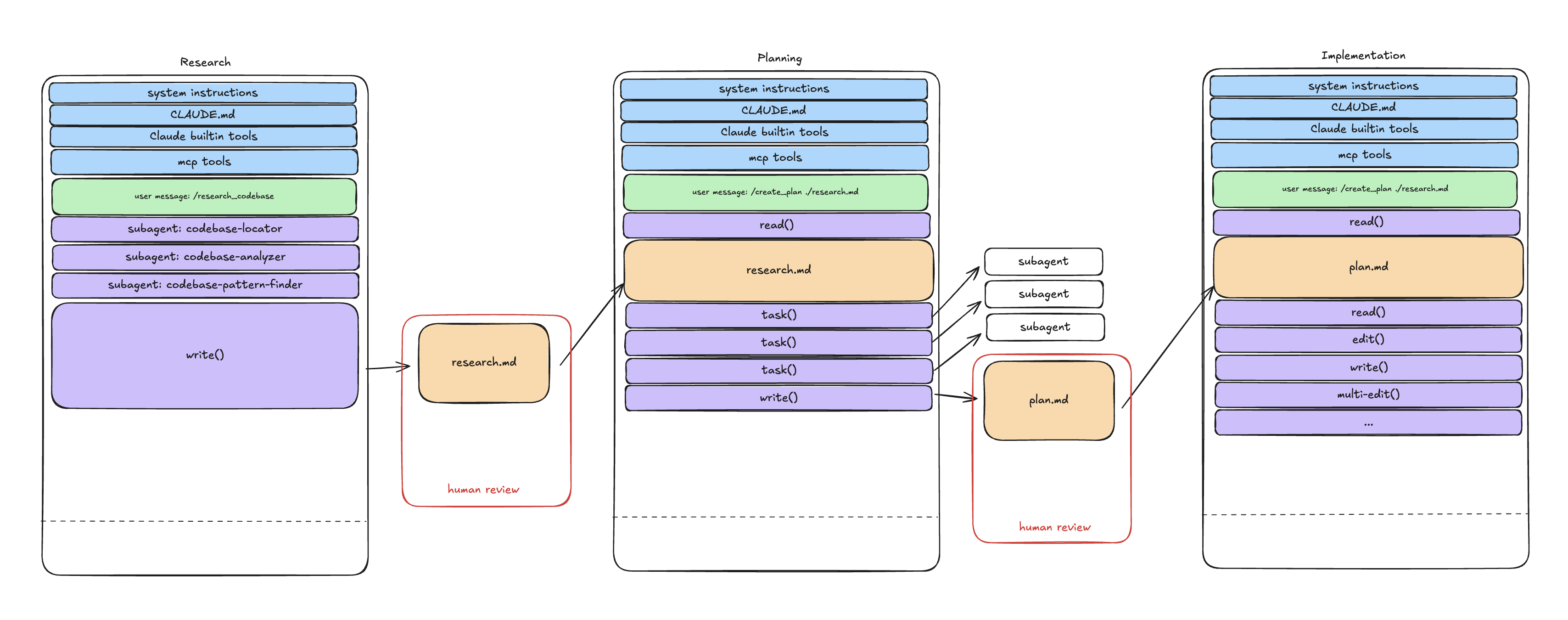
Implementation becomes almost mechanical. The agent has explicit instructions, file names, line numbers, code snippets. It's not reasoning about architecture anymore. It's executing.
Two things make this work:
- No open questions in the plan. If there's uncertainty during planning, stop and resolve it before coding starts.
- Human pause points between phases. After automated checks pass, pause for manual review. Don't let the agent run through all phases without checkpoints. This is where you catch issues that tests miss.
The context window stays small. Research might be 500 tokens, the plan maybe 1000. Varies by task, but the point is they're small. That leaves most of the window in the smart zone for implementation.
Compaction: don't feed the zombie
The pattern underlying this is compaction: deliberately compressing context between phases.
When you hit 40% of the context window, or when the agent starts making odd decisions (repeating itself, editing wrong files, losing track of the goal), ask it to summarize current progress into a markdown file. Review the summary, then start a new context with just the summary and the original plan.
You're doing what operating systems do with memory: paging out inactive context to make room for the working set. Keep the active information, archive the rest.
Don't outsource the thinking
There's no perfect prompt, no silver bullet.
Every workflow I've described requires you to:
- Read the research and verify it's correct
- Review the plan and catch mistakes before they become code
- Validate the implementation matches the plan
A bad line of code is one bad line. A bad line in a plan could become 100 bad lines of code. A fundamental misunderstanding in research sends the entire task in the wrong direction.
The leverage hierarchy
CLAUDE.md > prompts > research > plans > implementation
Focus human effort on the highest-leverage parts. Your CLAUDE.md (or .cursorrules) sets conventions once and affects every task. A good research prompt shapes how the agent understands your codebase. A solid plan template ensures consistent, reviewable output.
Spending hours reviewing implementation diffs doesn't help much if you skipped the 10 minutes reviewing the plan. Errors compound downstream.
The highest leverage move is catching errors early, in research and planning, where they're cheap to fix. AI can only amplify the thinking you've done, or amplify the lack of it.
Watch out for tools that generate markdown files to make you feel productive. If you're not reading them, you're not getting value.
When to apply this
This workflow is not for every task. Changing a button color? Just talk to the agent. Simple bug fix? Probably fine to go direct.
A rough heuristic:
| Task Complexity | Approach |
|---|---|
| Trivial (button color, typo) | Direct chat |
| Simple (single-file feature) | Light plan, direct implement |
| Medium (multi-file, single concern) | Research → Plan → Implement |
| Complex (architectural, multi-service) | Deep research → Detailed plan → Staged implement |
| Extremely complex | Whiteboard first, then RPI |
The ceiling of what you can solve goes up with more context engineering. But simple tasks don't need it. The effort should match the complexity.
Sometimes you'll go too big. Sometimes too small. That's fine. It takes reps to calibrate.
The seniority split
Staff engineers adopt AI more cautiously. The productivity gain is marginal when you already know what to build. Junior and mid-level engineers rely on it because it fills skill gaps, but it produces what I call "syntax-perfect, logic-broken" code. Staff ends up cleaning it up. Frustration builds on both sides.
Context engineering changes this. When AI-generated code is well-researched, explicitly planned, and carefully implemented, it becomes reviewable. It maintains architectural consistency. It respects conventions.
AI amplifies whatever thinking you've done. Or whatever lack of it.
What I'm still figuring out
I don't have this fully worked out. Some things that seem true so far: treating context as sacred, because every token either helps or hurts the next decision. Using sub-agents for context isolation rather than role-playing. Catching errors in research and planning where they're cheap to fix.
And honestly, just picking one tool and getting reps. The temptation to min-max across Claude, Cursor, and whatever new thing launched this week is real. I'm not sure I've resisted it well enough.
Context engineering is the difference between AI as a tech debt factory and AI as a multiplier. Models will get smarter. But the gains are available now, with better context.
What's your experience? I'm curious how this plays out on the messy, mature codebases where most of us actually work.
Further reading
- A Survey of Context Engineering for Large Language Models (Mei et al., 2025). Academic survey covering 1,400+ papers. GitHub companion.
- HumanLayer .claude/commands. Production prompts for research, planning, and implementation.
- Advanced Context Engineering for Coding Agents. Dex and Vaibhav's deep dive on research-plan-implement (1h27m).
- The New Code. Sean's talk from AI Engineer on treating code like assembly.
- Engineering strategy frameworks. My previous post on diagnosis before action, explicit tradeoffs, and frameworks that guide decisions.